Instruction
Congratulations on your purchase Autoinformer
Preparation
Check the availability of the required, please:
1. Autoinformer
2. Cable USB-mini USB (included)
3. Computer with the internet connection
4. Selected bus route
5. List of stops
6. A person who knows the location of stops /or circuit / service with the location of the stops on the map.
7. Stops audio record in wav format
8. Electrician.
9. Amplifier.
10. Wire
11. Loudspeakers
12. Bus with driver :)
For the binding stops necessary to:
1) Connect navigation device to your computer using a USB cable.
2)Go to the directory \residentflash\autoinf
3)Edit MRSCH.TXT - to enter your route (eg 21.TXT).
03,Perm1 station- Nagorny,\residentflash\autoinf\03.txt,\residentflash\autoinf\sound\
Located on the navigator in the directory \residentflash\autoinf
Notes to items 3 and 4:
Files saved in notepad/notebook in UTF-8.!
4) Create (on your computer or directly in your navigator) file of the route (eg 21.TXT), where you consistently (declaration order stops) write stopping checkpoints.
Please use the service of binding http://en.avtoinformator1.ru/select mode: Linking checkpoints (stops)
select the city where you want to bind
click (left mouse button) for setting checkpoint
move the cursor to the target point-click (left mouse button)
enter the name of the point and the voice file
select the course/direction of the blue segment
1345.93,1345.94,10034.38,10034.40,0,0, stop1.wav, namestop1
copy it to the route file (eg 21.TXT)
and so on every stop
Sequence of recording of stops in the file is not important. It is observed to bind convenience stops.
5) Copy the file (for example 21.TXT) in the directory \residentflash\autoinf. 6) Turn off the navigator. 7) Turn off navigator from the computer. 8) Turn on the navigator. 9) Run the program "Autoinformer". Click on the icon "Navigation" in menu of the navigator.
Press "settings". Press "List of checkpoint". Check playback voice files when you select the corresponding checkpoints/stops.
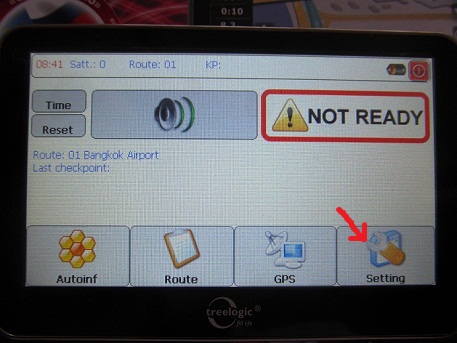
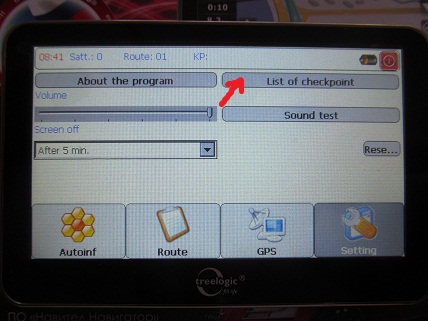
Pass once the entire route and check the Linking checkpoints (stops)
10) Install navigator on the bus through the amplifier to the speakers. Desirable that it made electrician.
11) The route is ready!
Save file *.txt to your computer for recording on the other autoinformers for the othrer transport of the route.
IT'S ALL SIMPLY (the average person understand this program ☺ )
A practice
At its discretion, you should make a test route. It’s a 2-3 checkpoints at a distance of 50-100 meters on foot. This allows making built-in battery and speakers.
IT'S ALL SIMPLY (the average person understand this program ☺ )
Technical questions - info@avtoinformator1.ru